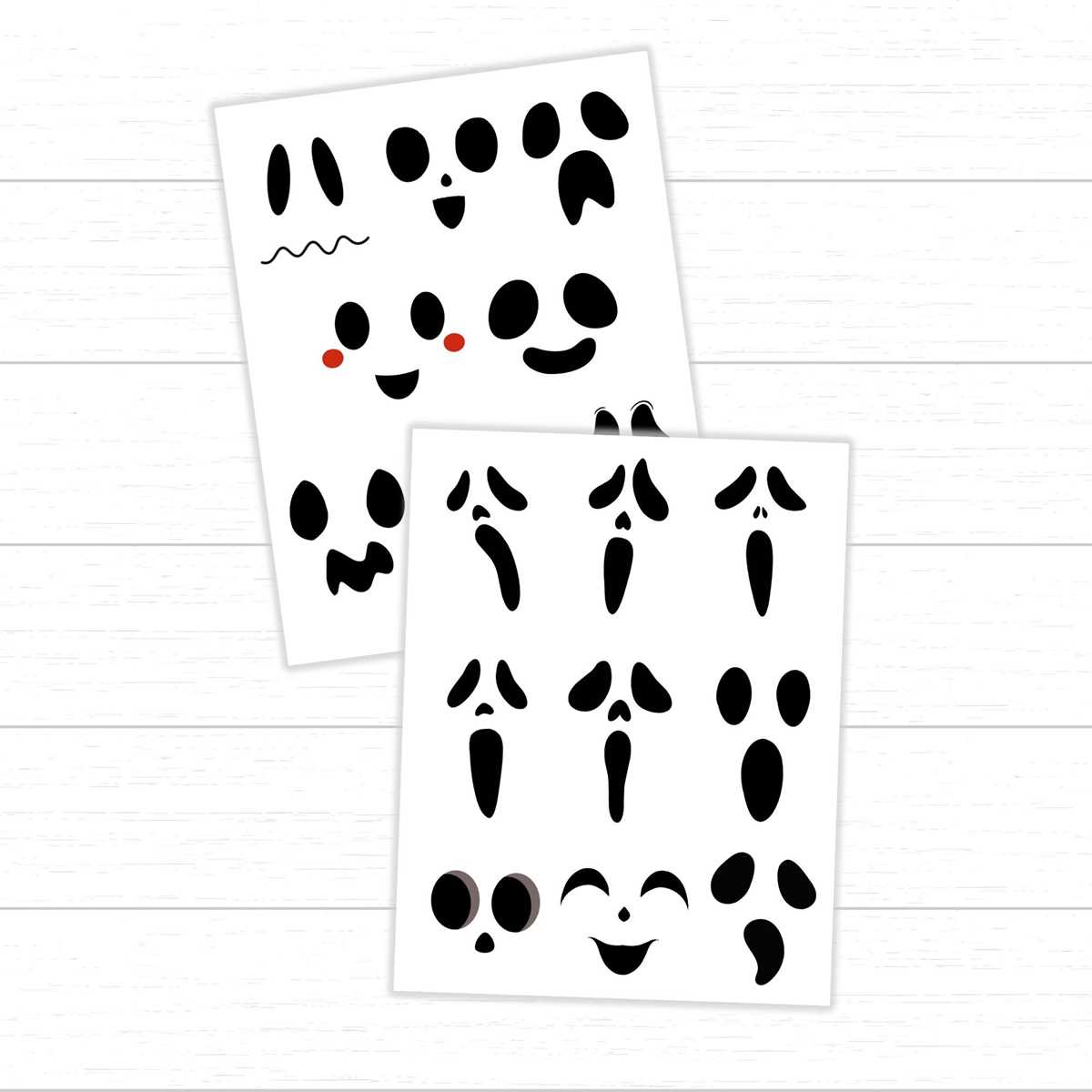
If you’re planning Halloween decorations or need fun elements for a themed event, crafting faces with simple cut-out shapes is a great option. Use basic printed patterns to add eerie expressions to your decorations or projects. These designs are easy to print, cut, and assemble, making them perfect for DIY activities.
Begin by downloading the design file, which offers a variety of creepy expressions that can be printed onto standard paper. Choose a design that matches your style, from wide, scary grins to menacing glares. After printing, cut out each section with precision to create clean edges, which will enhance the overall look.
Once your pieces are ready, you can apply them to pumpkins, windows, or use them in other craft projects. These simple shapes offer endless customization options. Whether you’re adding them to a party decoration or creating a spooky window display, these cutouts will bring an eerie touch without requiring much time or effort.
Using Printable Shapes for Halloween Crafting
Start by selecting the design that best fits your project. These printable forms are versatile, offering options for both frightening and fun looks. Choose from various facial expressions and sizes, depending on where you plan to place them. Large designs work well for windows or doors, while smaller ones are perfect for pumpkins or as part of a party backdrop.
After downloading the file, print it on sturdy paper to ensure durability, especially if you intend to use the cutouts for outdoor decorations. Regular printer paper may be fine for indoor displays, but thicker cardstock is recommended for longevity and better results when cutting intricate shapes.
Use sharp scissors or a craft knife for precision when cutting out the shapes. A steady hand is important for clean edges, which will make the facial features look sharp and distinct. If you’re creating several faces, consider using a paper cutter for quicker and straighter lines.
Once you have your pieces ready, try experimenting with different arrangements. Mix and match various mouth and expression shapes to create a range of emotions. This flexibility makes them ideal for creating a spooky scene or even a whimsical collection of friendly creatures.
After cutting, you can glue the shapes onto various surfaces. For a more dynamic effect, consider layering different facial elements. For instance, layering a wide grin over large hollow shapes creates a dramatic, 3D effect that stands out in the dark.
If you’re planning to use these designs for Halloween parties, think about attaching glow-in-the-dark stickers behind the cutouts for an eerie effect. When the lights are turned off, the faces will illuminate, creating an otherworldly atmosphere. This method works particularly well with windows and door displays.
For a more creative project, you can combine these shapes with other crafting materials. Try incorporating fabric or textured paper around the edges for a unique, customized touch. This approach adds an extra dimension to your decorations and makes the faces appear even more captivating.
Lastly, don’t hesitate to experiment with color. Although the traditional black-and-white scheme is classic, adding shades of red or green can give a more modern twist to your designs. Mix up the colors to suit your theme, and add extra flair to your Halloween decor with minimal effort.
How to Download and Print the Face Expression Designs
To begin, locate a reliable source or website offering the specific design you wish to use. Once you’ve found the desired face design, check that the file is in a standard format like PDF or JPEG for easy printing. Click the “Download” button to save the file to your device.
After downloading, open the file with your default image viewer or PDF reader. Ensure the file is properly formatted by checking its size and dimensions, making sure it fits your print settings. If necessary, adjust the scale in the print preview window to match your desired output size.
Next, select the type of paper best suited for your project. For crisp, clean results, use heavier paper like cardstock. If you’re printing for smaller-scale items like pumpkins or table decor, standard printer paper will suffice. Always choose the highest print quality available in your printer settings for the clearest details.
Once your paper is selected, load it into the printer and ensure the correct paper size is set in the print menu. Double-check that the page layout is set to portrait or landscape based on the design’s orientation, and that margins are properly adjusted to avoid cutting off any parts of the print.
After printing, allow the paper to dry completely before handling or cutting. This will prevent smudging or bleeding, especially when using inkjet printers. Use a sharp pair of scissors or an X-Acto knife to carefully cut out the features for a precise, neat finish.
If you plan to print multiple copies, repeat these steps for each one, ensuring consistent print quality across all sheets. Having several faces ready allows you to create a larger display or multiple decorations for your event or home project.